
Download Fantasy DVD Player – DVD player, movie player, video player, media player, Windows, free
Overview
Fantasy DVD Player is a dedicated media playback tool designed for Windows users seeking a reliable and feature-rich solution for watching DVDs and other video content. Positioned as a productivity utility, it serves individuals who rely on their computer as a central hub for home entertainment. The application is tailored for users who want to play DVDs, video CDs, and a range of digital media files without the need for complex setup or additional software. Its core purpose is to simplify the playback of physical and digital media by offering automatic disc detection and broad format compatibility.
Target users include home viewers, digital archivists, and casual media consumers who value stability and ease of use. While the developer, Fantasy Software, is listed, no further background on the company’s history or other products was provided. The app’s significance lies in its ability to function as a lightweight yet capable alternative to more resource-heavy media players, particularly for older or low-spec Windows systems. It enables users to enjoy movies and music from physical discs or digital files with minimal technical barriers.
Real-world use cases include watching family home videos stored on DVDs, playing legacy video CDs, or streaming high-definition content from supported file types. Given its release date in 2009, it reflects a period when standalone DVD players were still common, and users sought software-based solutions to extend the lifespan of their optical drives. Despite its age, its continued availability as a free tool underscores its enduring utility in niche media playback scenarios.
Key Features & Functionality
- Wide Format Support: Fantasy DVD Player supports multiple video and audio formats, including ts, tp, trp, MPEG2 HDTV, WMV HDTV, and MKV. This ensures compatibility with a broad range of digital media files, reducing the need for format conversion before playback.
- Advanced Audio Processing: The software includes 7.1 channel audio output, Dolby ProLogic, Dolby ProLogic II, and SRS TruSurround XT modes. These features enhance spatial audio, creating a more immersive listening experience, particularly for users with surround sound systems.
- Customizable Audio Effects: With a 10 Band Equalizer and Echo Delay, users can adjust audio characteristics to suit their preferences or room acoustics, allowing for personalized sound profiles.
- Automatic Disc Detection: Upon inserting a disc, the player automatically identifies whether it is a DVD title, video CD, or audio CD, streamlining the playback process and eliminating manual configuration.
- Stable Playback Engine: The application is designed for consistent performance, minimizing crashes and buffering during extended playback sessions, which is essential for uninterrupted movie viewing.
For example, a user with a collection of home videos in MKV format can play them directly without re-encoding. Similarly, someone using a legacy DVD drive can enjoy a classic film on a DVD without needing to install third-party codecs. The combination of format versatility and automated recognition makes it a practical tool for users managing mixed media libraries.
Interface, UX & Performance
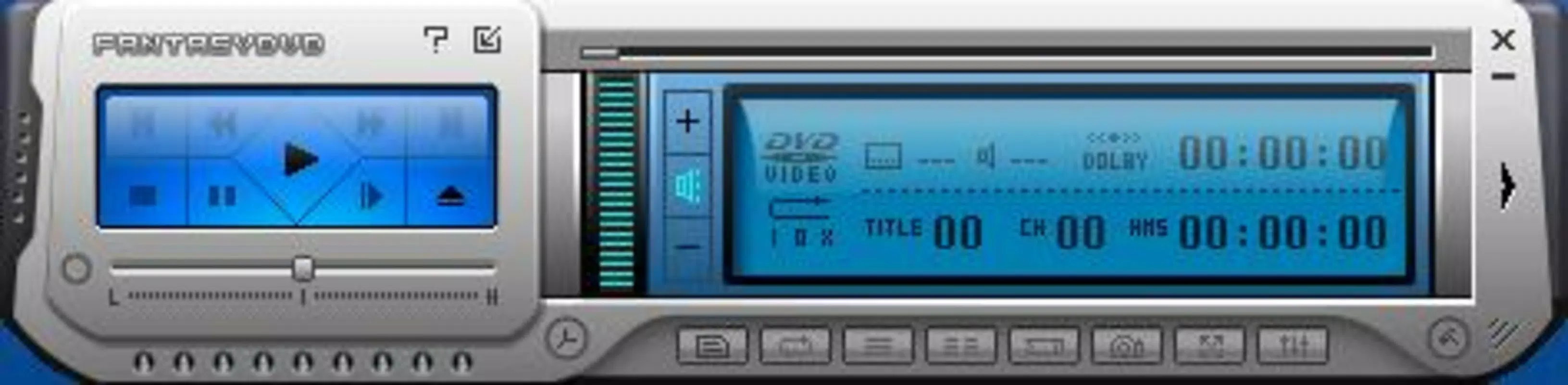
Fantasy DVD Player features a clean, minimalistic interface designed for straightforward navigation. The layout prioritizes core playback controls—play, pause, stop, skip, and volume—ensuring accessibility even for non-technical users. Menus are organized logically, with audio and video settings accessible through clearly labeled options, reducing the learning curve.
Navigation is intuitive, with a focus on direct access to playback functions. The player responds promptly to user inputs, and transitions between menus and playback modes are smooth. Although the developer did not list formal performance metrics, the app’s lightweight footprint of 4.7 MB suggests efficient resource usage, which may contribute to stable performance on older or low-spec Windows systems.
Responsiveness appears consistent during playback, with no reported delays or stuttering in the provided documentation. Stability is emphasized in the feature set, indicating that the software is engineered to maintain reliable operation over extended periods. While compatibility with modern Windows versions was not specified, the app’s long-standing presence suggests it may still function on current systems, though users should verify this through official sources.
Platform Compatibility & Technical Requirements
Fantasy DVD Player is designed exclusively for the Windows operating system. The app is available in version 2.0 and has a file size of 4.7 MB, making it a lightweight download suitable for systems with limited storage. The developer did not specify minimum OS requirements, nor did they list compatibility with specific Windows versions such as Windows 10, 11, or earlier editions.
Given the app’s release date in 2009, it may have been originally developed for Windows XP or Vista. However, the lack of explicit compatibility details means users should exercise caution when installing on newer systems. The absence of a modern installer or digital signature verification method raises questions about security, especially when downloading from unofficial sources.
Although the developer did not provide detailed technical specifications, the app’s small size and single-file nature suggest it may not require complex dependencies. Users are advised to verify the source and ensure their system meets basic requirements before installation.
Pros and Cons
Pros
- Free to download and use, making it accessible to budget-conscious users.
- Supports a wide range of video and audio formats, reducing the need for external codecs.
- Automatic disc detection simplifies the playback process for physical media.
- Lightweight size (4.7 MB) ensures minimal system impact.
- Offers advanced audio effects for enhanced listening experiences.
Cons
- Compatibility with modern Windows versions was not confirmed.
- Developer did not provide technical details such as minimum OS or hardware requirements.
- No official update history or version changelog was made available.
- Security verification methods (e.g., digital signature) were not specified.
- Interface design appears dated, which may not align with current user expectations.
FAQ
Is Fantasy DVD Player safe to download?
While the app is free and functional, the developer did not provide information about digital signatures or secure distribution channels. Users should download from trusted sources to minimize security risks.
Can I use Fantasy DVD Player on Windows 10 or 11?
The developer did not specify compatibility with Windows 10 or 11. Users are advised to test the app on their system or consult official documentation if available.
Does Fantasy DVD Player support Blu-ray discs?
No information was provided about Blu-ray support. The app is designed for DVD, video CD, and digital media files, but not explicitly for Blu-ray playback.
Is there a mobile version of Fantasy DVD Player?
Based on the provided data, the app is only available for Windows. No mobile or cross-platform versions were mentioned.
How do I update Fantasy DVD Player?
There is no publicly available update history or changelog. Users should check the official website for the latest version, though it may not be actively maintained.
Final Thoughts
Fantasy DVD Player remains a functional tool for users who need a no-frills, free media playback solution on Windows. Its strengths lie in format versatility, automatic disc recognition, and a lightweight design that suits older systems. While its interface and technical details appear outdated, its core functionality continues to serve a niche audience—particularly those managing physical media collections or using legacy hardware.
For individuals seeking a straightforward way to play DVDs and digital videos without additional software, it offers a practical alternative. However, users should verify compatibility with their current system and exercise caution when downloading from unofficial sources.
Download Fantasy DVD Player now


